
A practical typing guide
Telugu InScript Keyboard Layout
A printable reference for the normal and Shift layers used by our Telugu keyboard. Follow English key positions, check combining signs, and try the same letters in the live tool.
Try the online keyboardDownload the Telugu keyboard layout PDF or PNG
The PDF contains two A4 landscape pages: normal first, Shift second. Print at actual size or fit to A4 landscape. Each PNG is 2800 pixels wide so you can zoom in or save a layer separately.
This is Keyman Telugu Basic 1.1, the InScript-based mapping implemented by this website, using US physical key labels. It covers the normal and Shift layers. AltGr and other system-specific extensions are not included. If your operating system uses another layout or version, its output may differ.
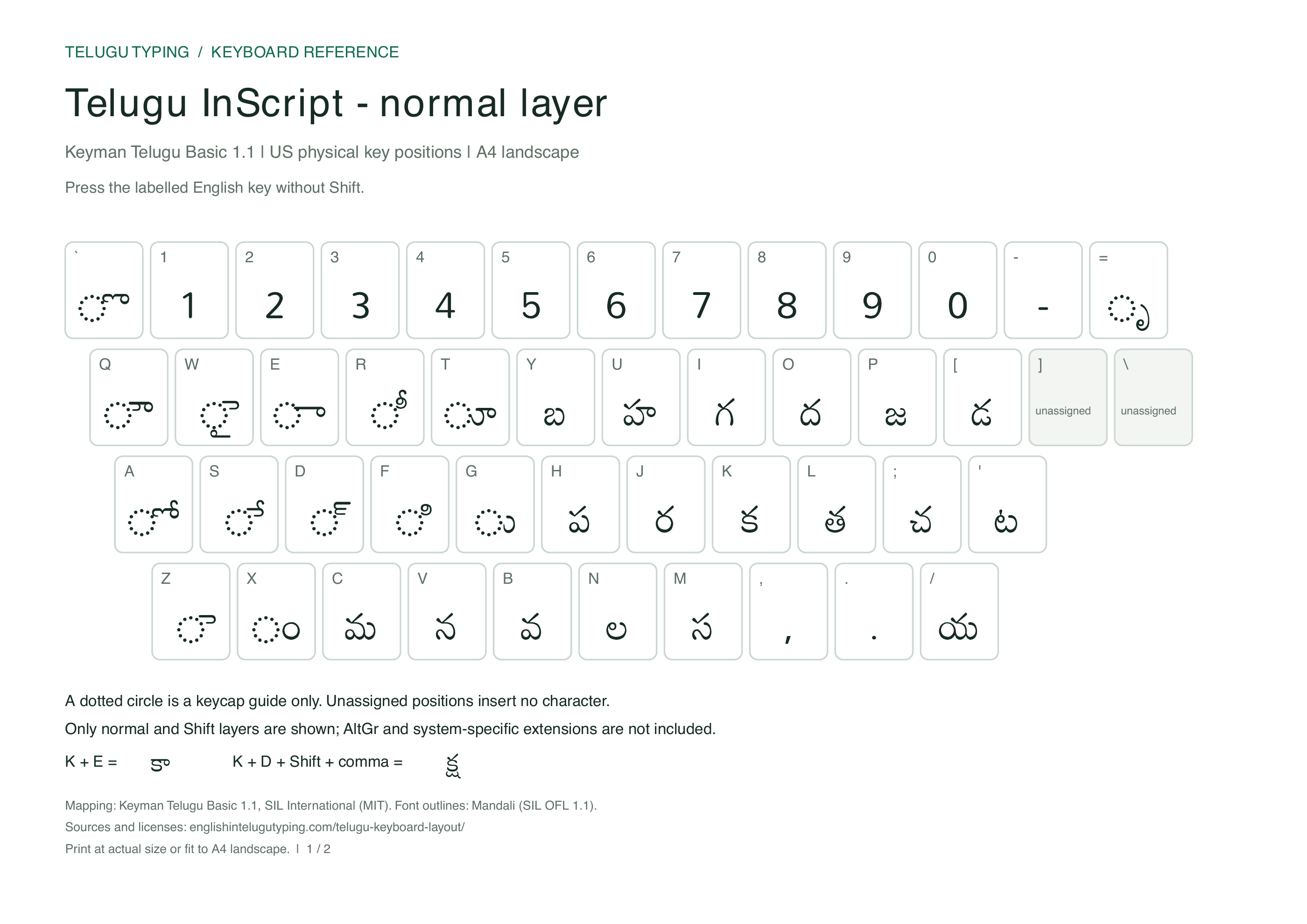
Normal layer
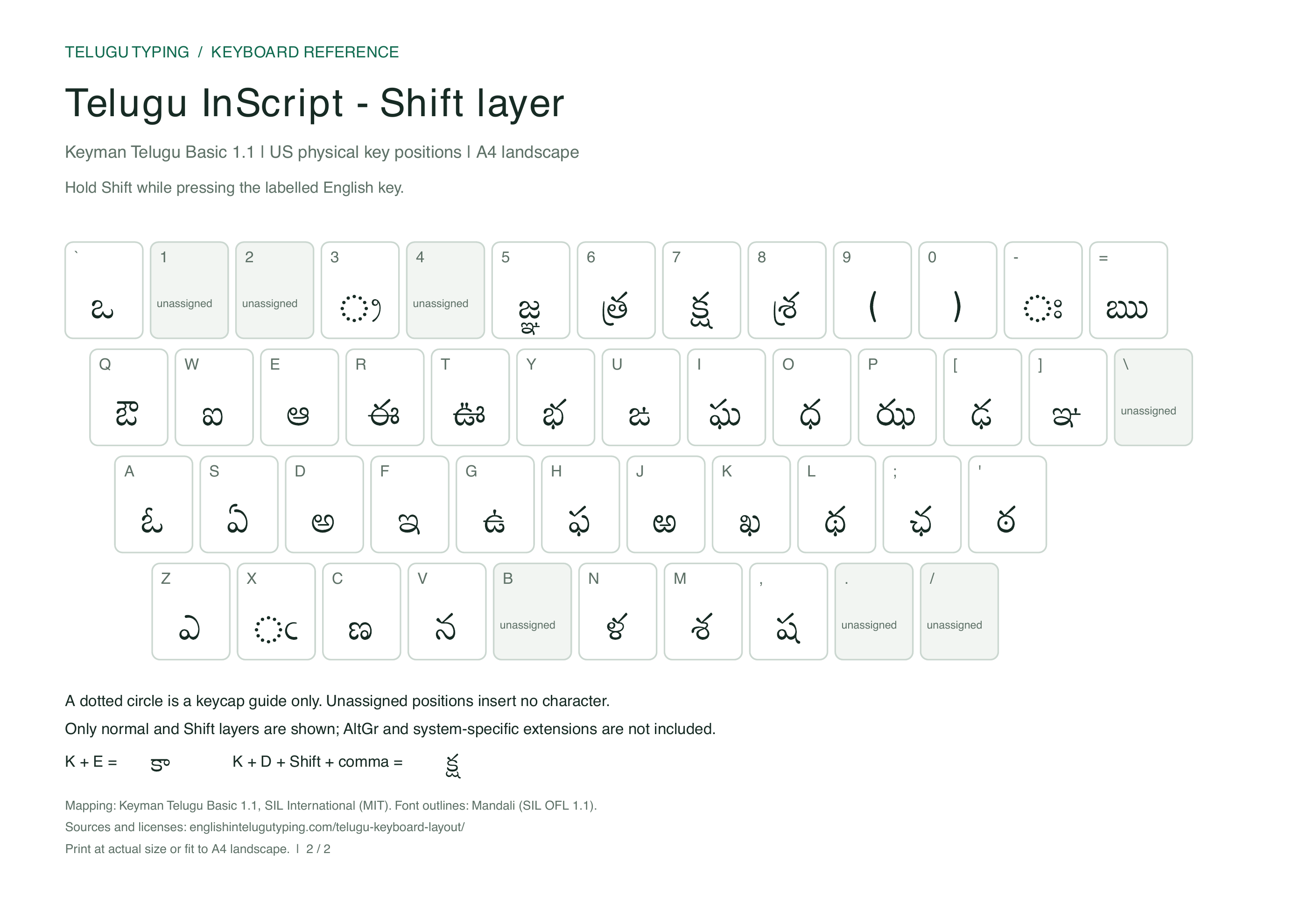
Shift layer
Read the keycaps correctly
The small Latin label identifies an English physical key. The Telugu label is its output in that layer. The diagrams omit function keys and large control keys to keep the character mapping readable.
A dotted circle ◌ helps you see a combining sign on its own. It is a display guide and is not inserted into your text. Unassigned cells do not represent hidden letters. The normal number row uses ASCII digits.
InScript is positional: the K key enters క in this layout. To type a word by its sound with English letters and choose suggestions instead, use the phonetic typing tool.
Combine letters and vowel signs
- Press K for క, then E for the vowel sign ◌ా. The result is కా.
- Press K, then F for ◌ి. The result is కి; the combined form can look different from the isolated keycap. Enter the consonant before its sign.
- Press K, D for the virama, then Shift + , for ష. The combined result is క్ష.
Use Undo to reverse an edit in the online keyboard. Its backspace removes a complete grapheme cluster, which may contain several Unicode characters. Rendering can differ by font, so compare the text rather than expecting identical letter shapes across apps.
Complete key mapping and layout sources
The table gives the same data used to generate the diagrams and the online keyboard. On a narrow screen, scroll the table sideways if needed.
| English key | Normal | Shift |
|---|---|---|
| ` | ◌ొ | ఒ |
| 1 | 1 | Unassigned |
| 2 | 2 | Unassigned |
| 3 | 3 | ◌్ర |
| 4 | 4 | Unassigned |
| 5 | 5 | జ్ఞ |
| 6 | 6 | త్ర |
| 7 | 7 | క్ష |
| 8 | 8 | శ్ర |
| 9 | 9 | ( |
| 0 | 0 | ) |
| - | - | ◌ః |
| = | ◌ృ | ఋ |
| Q | ◌ౌ | ఔ |
| W | ◌ై | ఐ |
| E | ◌ా | ఆ |
| R | ◌ీ | ఈ |
| T | ◌ూ | ఊ |
| Y | బ | భ |
| U | హ | ఙ |
| I | గ | ఘ |
| O | ద | ధ |
| P | జ | ఝ |
| [ | డ | ఢ |
| ] | Unassigned | ఞ |
| \ | Unassigned | Unassigned |
| A | ◌ో | ఓ |
| S | ◌ే | ఏ |
| D | ◌్ | అ |
| F | ◌ి | ఇ |
| G | ◌ు | ఉ |
| H | ప | ఫ |
| J | ర | ఱ |
| K | క | ఖ |
| L | త | థ |
| ; | చ | ఛ |
| ' | ట | ఠ |
| Z | ◌ె | ఎ |
| X | ◌ం | ◌ఁ |
| C | మ | ణ |
| V | న | న |
| B | వ | Unassigned |
| N | ల | ళ |
| M | స | శ |
| , | , | ష |
| . | . | Unassigned |
| / | య | Unassigned |
The mapping is adapted from SIL’s Telugu Basic 1.1 keyboard, distributed under the MIT license. Microsoft identifies the Windows Telugu layout as KBDINTEL, KLID 0000044A. This chart documents our retained version rather than promising every system variant.
Chart lettering uses Mandali under the SIL Open Font License. The PDF draws the Telugu letter outlines, so printing does not require installing that font. Use the text table above for selectable characters. For sound-based input and Windows setup, see the computer input overview.